
Below are the reasons the order was marked as Suspicious:

If this is a valid customer you can set them as Verified in customer maintenance and the next time they order they will be excluded from the suspicious order checks. Credit Card transactions will always be checked by Authorize.net
Laptop displaying the BOX Partners website with text “Your guide to boxpartners.com – Packaging made easy, every step of the way.”
BOXPARTNERS.COM Guide › Place Orders

How To Place Orders

Make sure you are logged into your boxpartners.com account to begin.

Start Your Order

  • Go to My Account → Place Order → Start a New Order
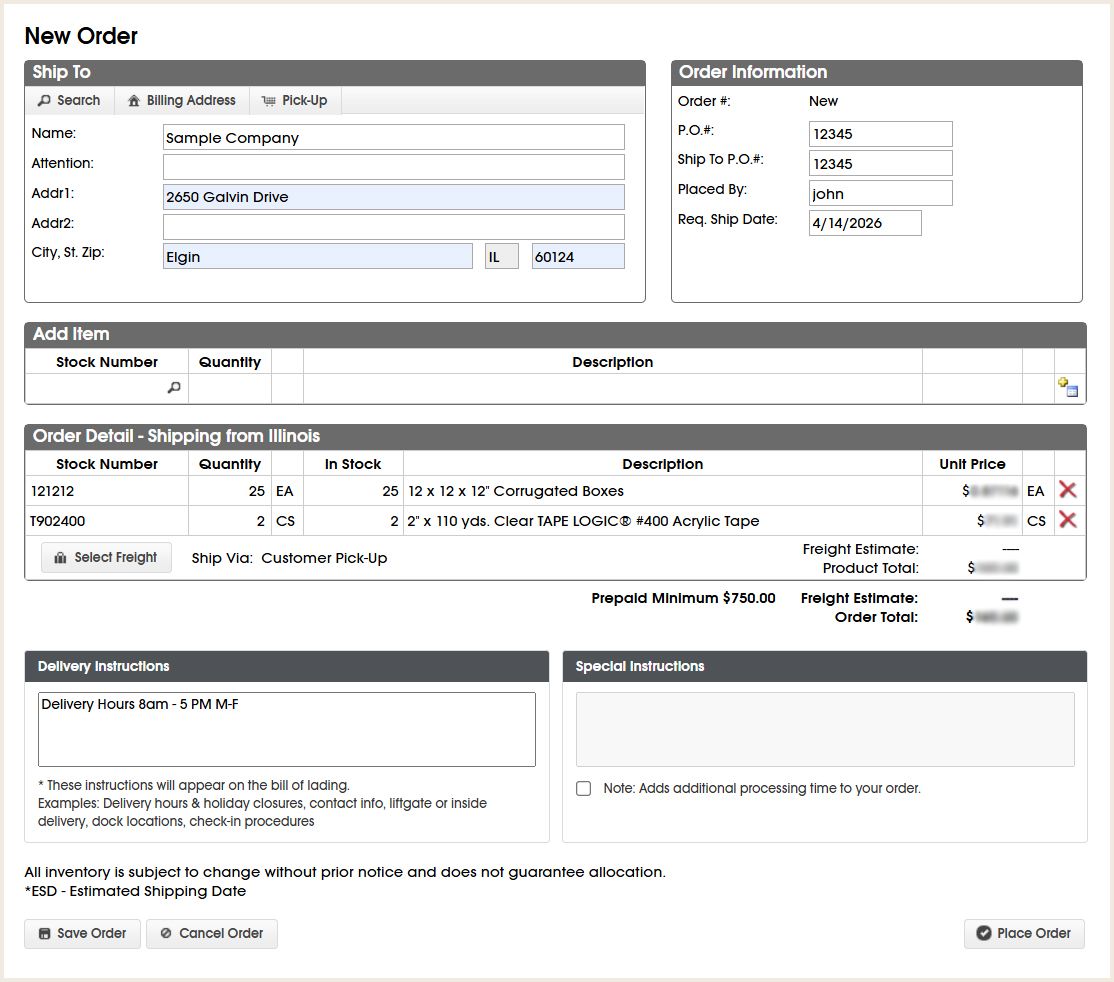
  • Add your Ship-To Address. Select an existing address, use your billing address, or enter a new shipping address.
  • Add items to your order

BOX operates five strategically located distribution centers. If items cannot be fulfilled from a single warehouse, the order will split.

Review Your Order

  • Review your order details. Confirm the ship-to address, order information, and items.
  • Once all items are in your cart, click Select Freight.

Choose Freight

  • A popup window will display available freight options with estimated rates.
  • Choose from Carrier, Parcel, or Customer Pick-Up, depending on order size and location.
  • Click Apply to confirm your freight selection.


New Order Screen

Confirm & Place Order

  • The Order Detail section will update with the selected freight option and estimated charges.
  • Review all order information, then click Place Order to complete your purchase.


Ordering With Credit Terms

If paying by credit card, a popup will appear. Enter your payment details and click Authorize Payment and Place Order to complete your order.